
On this page +
Most to-do apps make you stop what you’re doing, open a window and type. Ziko lets you just say it. It’s a free, open-source AI voice to-do assistant that lives in the corner of your screen as a small robot pet — and it’s built so that when it says “Done, I’ve added that”, it actually did.
Download Ziko for Linux · Windows preview · Source code · How I built it
What is Ziko?
Ziko is a desktop app with two parts you see and one you don’t:
- The pet — a 44-pixel monochrome robot holding a to-do notebook. Its eyes follow your mouse, it blinks, doodles and naps when ignored, and it listens, thinks and talks when you speak to it.
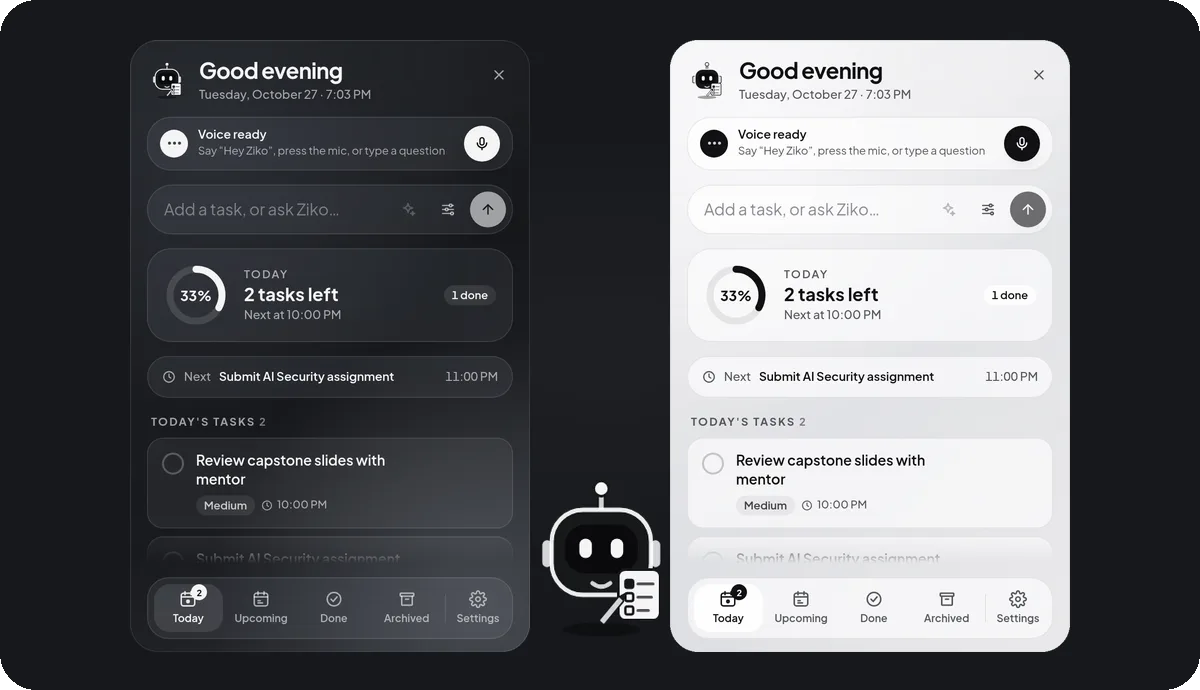
- The panel — click the pet for a glass task panel: today’s tasks, a progress ring, upcoming reminders, and a box to type or ask.
- The backend — a local service that stores your tasks, fires reminders, listens for “Hey Ziko” and runs the voice conversation.
What can you do with it?
| You say… | Ziko does |
|---|---|
| ”Hey Ziko” | Greets you — “Hey Boss! How’s your day going?” — with today’s tasks, anything overdue and the next deadline |
| ”Remind me to call the bank tomorrow at 11, an hour before” | Creates the task, sets the reminder, and repeats the day and time back |
| ”What should I work on next?” | Answers from your real list, not from memory |
| ”Move the report to Friday at 4” | Updates the deadline |
| ”Mark call mom as done” | Completes it — or asks which one if two tasks match |
| ”Delete the old meeting” | Asks you to confirm first, then archives it (you can restore it) |
| “Tell me a joke” | Tells a short clean one, and laughs |
Everything also works by hand: type a task and press Enter, tick it off, snooze a reminder. With no API key or no internet, everything except voice keeps working.
How does an AI voice to-do assistant stay trustworthy?
A voice assistant that takes actions has one job above all: never claim it did something it didn’t. Ziko is built around that.
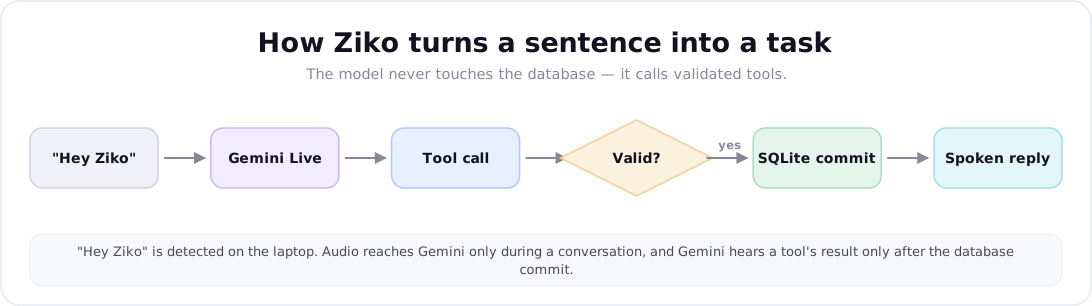
- The model never touches your data directly. Gemini Live can only call eleven explicit tools — create, list, look up, update, complete and archive tasks, three reminder tools, a daily summary and the current time.
- Every call is validated and committed first. The tool runs in its own database transaction, and the model hears the result only after it’s saved.
- Ambiguity becomes a question. Two matching tasks, a vague time like “later”, or a request to delete — Ziko asks instead of guessing.
That’s the same principle behind any agent worth deploying: the model decides, but the loop around it — validation, feedback and stop rules — is what makes it safe to let it act.
Does it need the cloud?
Only for the conversation. Ziko uses Google’s Gemini Live, a speech-to-speech model that hears audio and speaks back directly, which is why it sounds natural and replies quickly. Everything else stays on your computer:
| Part | Where it runs |
|---|---|
| Tasks, reminders, settings | Local SQLite database |
| ”Hey Ziko” wake word | On your CPU (a custom-trained ONNX model) |
| Reminder notifications | Local scheduler — works with the panel closed and the AI off |
| Your Gemini API key | System keychain, never shown or logged |
| Understanding and speaking | Gemini Live, only during a conversation you start |
The microphone closes by itself after 10 seconds of silence, and the panel shows a red Mic on chip whenever audio is going to Gemini.
How do you install Ziko on Linux?
- Download
Ziko_<version>_amd64.debfrom the latest release. - Install it:
sudo apt install ./Ziko_*_amd64.deb - Open Ziko from your app menu. The pet appears in the bottom-right corner.
- To turn on voice, click the pet → Add key, and paste a free Gemini API key from Google AI Studio. Ziko tests the key with Google before saving it.
- Optional: Settings → General → Start Ziko when I log in.
The full user manual — every setting, troubleshooting and uninstalling — is in the README on GitHub.
Is it heavy?
No. Measured on the release build on a 20-core laptop: about 0.9% of total CPU while idle with “Hey Ziko” listening, about 0.25% with the wake word off, and roughly 830 MB of memory across the app and its local backend. The pet is still between short moves rather than animating forever, which is what keeps an always-visible companion cheap.
Who built it, and can you get one like it?
I’m Muhammad Junaid, an AI engineer who builds voice agents, AI agents and full-stack AI products. Ziko is open source so you can read exactly how it works — the tools, the reminder scheduler, the wake word and the Linux desktop fixes are all written up in the build log.
If you need a voice assistant, an AI agent that takes real actions, or an AI feature inside your product built with the same care, see what I build, browse my other projects, or get in touch.
Sources & further reading
// faq
Frequently asked questions
Is Ziko free?+
Yes. Ziko is free and open source under the MIT license — you can use it, change it and share it, including commercially. Voice uses Google's Gemini API with your own key; Google offers free usage on some plans, and anything beyond that is billed to your Google account, not by Ziko.
Does Ziko work without the internet?+
Mostly. Tasks, reminders, notifications and the "Hey Ziko" wake word all run on your computer. Only the voice conversation itself needs the internet, because speech is understood by Gemini. With no connection Ziko says "AI offline — manual mode" and everything else keeps working.
Is my data private?+
Tasks, reminders and settings are stored only in a local SQLite database. Nothing is sent while Ziko is idle — the wake word is detected on-device. Audio goes to Gemini only during a conversation you start, Ziko doesn't record or save conversations, and your API key is kept in the system keychain and never shown again.
Which operating systems does Ziko support?+
Linux is the main platform: a .deb package for Ubuntu and Debian, tested on Ubuntu 24.04 with GNOME on Wayland. A Windows installer is available as an untested preview, built automatically from the same code.
What can I say to Ziko?+
Plain sentences: "Add a task to finish the report tomorrow at 10 and remind me 30 minutes before", "What's on today?", "Move the report to Friday", "Mark call mom as done", "Delete the old meeting" (Ziko asks you to confirm first), or "Tell me a joke". If two tasks match, it asks which one rather than guessing.
Can I change the wake word or what Ziko calls me?+
The wake phrase is "Hey Ziko" — the model was trained for that phrase — but you can make it more or less sensitive, or turn it off and use the mic button or a double-click instead. Ziko calls you "Boss" by default; change it in Settings under "What should Ziko call you?".