
On this page +
“Graph engineering” started spreading in July 2026, about a month after “loop engineering” landed. If you build with agents, you have probably seen both terms and wondered whether the second one obsoletes the first.
It does not. They solve different problems, and the difference is easy to state.
The difference in one line
Loops are how one agent gets better. Graphs are how many steps get wired together.
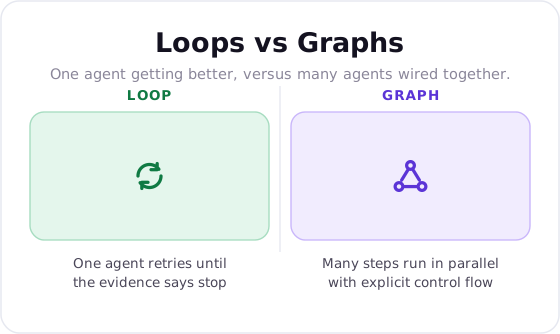
A loop is about time — the same agent, going again, with better information. A graph is about structure — what runs next, what runs at the same time, what waits.
Three layers, three jobs
Most confusion clears up once you see that these are not competing ideas but stacked ones.
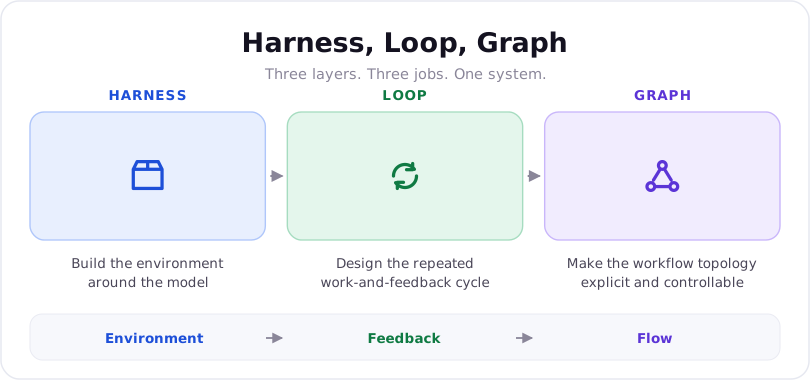
- Harness — the environment around the model: tools, files, memory, permissions, traces. What the agent can do.
- Loop — the repeated work-and-feedback cycle. How one step gets good. (The seven parts of a loop, if you want the detail.)
- Graph — the topology. What runs when, and what needs a human.
You need all three. A brilliant loop inside a bad harness has no tools to work with. A clean graph over agents with no loops just fails faster in a nicer shape.
The comparison, straight
| Loop engineering | Graph engineering | |
|---|---|---|
| Unit | One agent over time | Many steps in a structure |
| Solves | Reliability — getting to correct | Control flow and latency |
| Concurrency | None. Strictly sequential | Native. Fan out and join |
| Failure handling | Retry with feedback | Recovery paths, checkpoints, partial restart |
| Human involvement | Usually outside the loop | An explicit gate node |
| Fails when | No real evidence or no stop rule | Edges that are not real dependencies |
| Reach for it when | Output quality is the problem | Structure or speed is the problem |
Why loops hit a ceiling
A loop processes plan → code → review → fix → review → fix, one after another. That is correct, and often exactly what you want.
But consider a review step with three reviewers: one checking correctness, one security, one performance. None of them reads the others’ output. In a loop they run one after another for no reason at all, and you pay three times the latency for work that could have taken one.
That is not a prompt problem or a model problem. It is a shape problem, and no amount of loop tuning fixes it.
The fake-edge test
Here is the single most useful habit when you start drawing graphs.
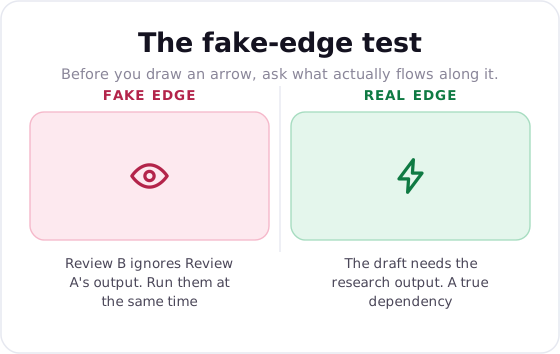
Before you draw an arrow, ask what data flows along it.
If step B does not consume step A’s output, that edge is fake. You drew it because you thought of A first, or because the steps feel like they happen “in that order”. Every fake edge is latency you chose without meaning to.
Real edge: the draft genuinely needs the research output. Remove the arrow and the draft has nothing to work from.
Fake edge: Review B never reads Review A. Remove the arrow and both still work — now simultaneously.
Most first-draft agent graphs are a straight line, because a straight line is how we describe processes in prose. Run the fake-edge test over yours and you will usually find half the arrows are removable.
Where loops live inside a graph
The two are not alternatives. Each node in a graph can contain its own loop.
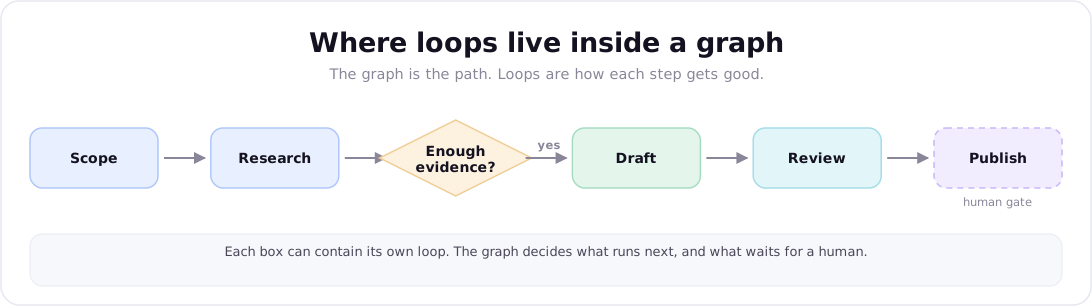
The graph decides what runs next. The loop decides how good each step gets before moving on. The human gate sits where the action becomes irreversible — publishing, sending, deploying, spending.
What it looks like in code
The whole idea, without a framework — the important part is asyncio.gather:
import asyncio

async def review_stage(draft):
    # THREE REAL REVIEWS, NO REAL EDGES BETWEEN THEM.
    # In a loop these run one after another. Here they cost one round trip.
    correctness, security, performance = await asyncio.gather(
        review(draft, lens="correctness"),
        review(draft, lens="security"),
        review(draft, lens="performance"),
    )
    return [correctness, security, performance]

async def pipeline(topic):
    research = await run_loop(f"research: {topic}")     # a loop, as one node
    draft    = await run_loop(f"draft from: {research}") # real edge: needs research

    findings = await review_stage(draft)                 # fan out, then join

    if any(f.blocking for f in findings):
        draft = await run_loop(f"fix: {findings}")       # recovery path, not a restart

    return await human_gate(draft)                       # irreversible → ask first
Note what the graph gives you that a loop cannot:
asyncio.gather is the whole point. Three reviews, one round trip. In a loop this is three.
The fix step is a recovery path, not a restart. A loop that fails at review usually starts over. The graph re-enters at the node that failed and keeps the research it already paid for.
human_gate is a node. In loop-only designs the human sits outside, watching. Making the gate part of the structure means the workflow can wait properly instead of you remembering to check.
When to move from a loop to a graph
Three signals. Any one is enough:
- Independent steps are running sequentially. The fake-edge test finds these.
- You need approval before something irreversible. Publishing, deploying, emailing a client, spending money.
- A late failure forces a full restart. No checkpoints means you re-pay for every earlier step.
If none of those describe your system, you do not have a graph problem yet. Adding orchestration now buys you complexity and nothing else.
How to actually make the move
Do not rewrite. The migration that works is boring:
- Keep your existing loop. Make it one node.
- Find the step inside it that is slowest or fails most.
- Split only that step out into its own node.
- Run the fake-edge test on the two or three nodes you now have.
- Stop. Ship it. Repeat when the next bottleneck shows up.
A prompt for step 2, which is the one worth thinking about carefully:
Here is my current agent workflow, written as a sequence of steps:

[PASTE YOUR STEPS IN ORDER]

Do three things:

1. For every arrow between consecutive steps, tell me whether it is a REAL edge
   (the later step consumes the earlier step's output) or a FAKE edge (I just
   listed them in that order). Quote what data flows along each real edge.

2. Group the steps that have no real edges between them — those can run in
   parallel today.

3. Tell me which single step, if split out of the main sequence, would cut the
   most wall-clock time. Show the before and after as a list of stages, and be
   explicit about what still has to wait.

Do not suggest a framework. I want the topology first.
That last line is deliberate. Reaching for LangGraph before you have drawn the graph is how people end up with orchestration overhead wrapped around a workflow that was still a straight line.
The bottom line
Loop engineering made single agents reliable. Graph engineering makes workflows fast and controllable. They stack: the harness gives the model an environment, loops make each step good, the graph decides what runs when.
If your agent produces wrong answers, you have a loop problem — go fix your evidence and your stop rule. If your agent produces right answers slowly, or cannot recover from a failure halfway through, or does something irreversible without asking, you have a graph problem.
And before you draw any arrow, ask what flows along it. Most of them turn out to be fake.
Sources & further reading
// faq
Frequently asked questions
What is graph engineering?+
Graph engineering is designing an AI system around an explicit graph — nodes that are steps or agents, edges that are real dependencies — so the workflow's topology is something you control rather than something that emerges from a prompt. It makes parallel work, retries, recovery paths and human approval gates first-class parts of the design instead of accidents.
What is the difference between graph engineering and loop engineering?+
Loops describe one agent's behaviour over time: act, check, feed back, repeat. Graphs describe the structure connecting many steps: what runs next, what runs at the same time, what waits for a human. Loops cannot do concurrency — a loop processes plan, code, review, fix strictly in order. A graph can dispatch three reviewers simultaneously and join their results.
Do I need to replace my loops with graphs?+
No, and you should not. The relationship is additive. Keep the loop you have and make it a single node in the graph, then split off only the step that is failing or blocking. Rewriting a working loop as a graph before you have a concurrency or control-flow problem adds orchestration overhead with no payoff.
When should I move from a loop to a graph?+
Three signals: steps in your loop do not depend on each other and are running sequentially anyway; you need a human approval before an irreversible action; or a failure halfway through forces you to restart from the beginning because there is no checkpoint. Any one of those is a topology problem, and topology is what a graph makes explicit.
What is the fake-edge test?+
Before drawing an arrow between two nodes, ask what data actually flows along it. If step B does not consume step A's output, the edge is fake — you drew it because you happened to think of A first, and it is silently forcing sequential execution on independent work. Real edges carry a genuine dependency; fake edges are just latency you chose.
Is graph engineering the same as using LangGraph?+
No. LangGraph is one implementation, and a good one, but graph engineering is the design practice — deciding the nodes, the real edges, the join points and the gates. You can do it with a plain task queue, a DAG runner, or a few asyncio gathers. Picking the library before you have drawn the graph is the usual mistake.